What we assumed
Signal flow
What to listen for
Watch out for
What this one cost
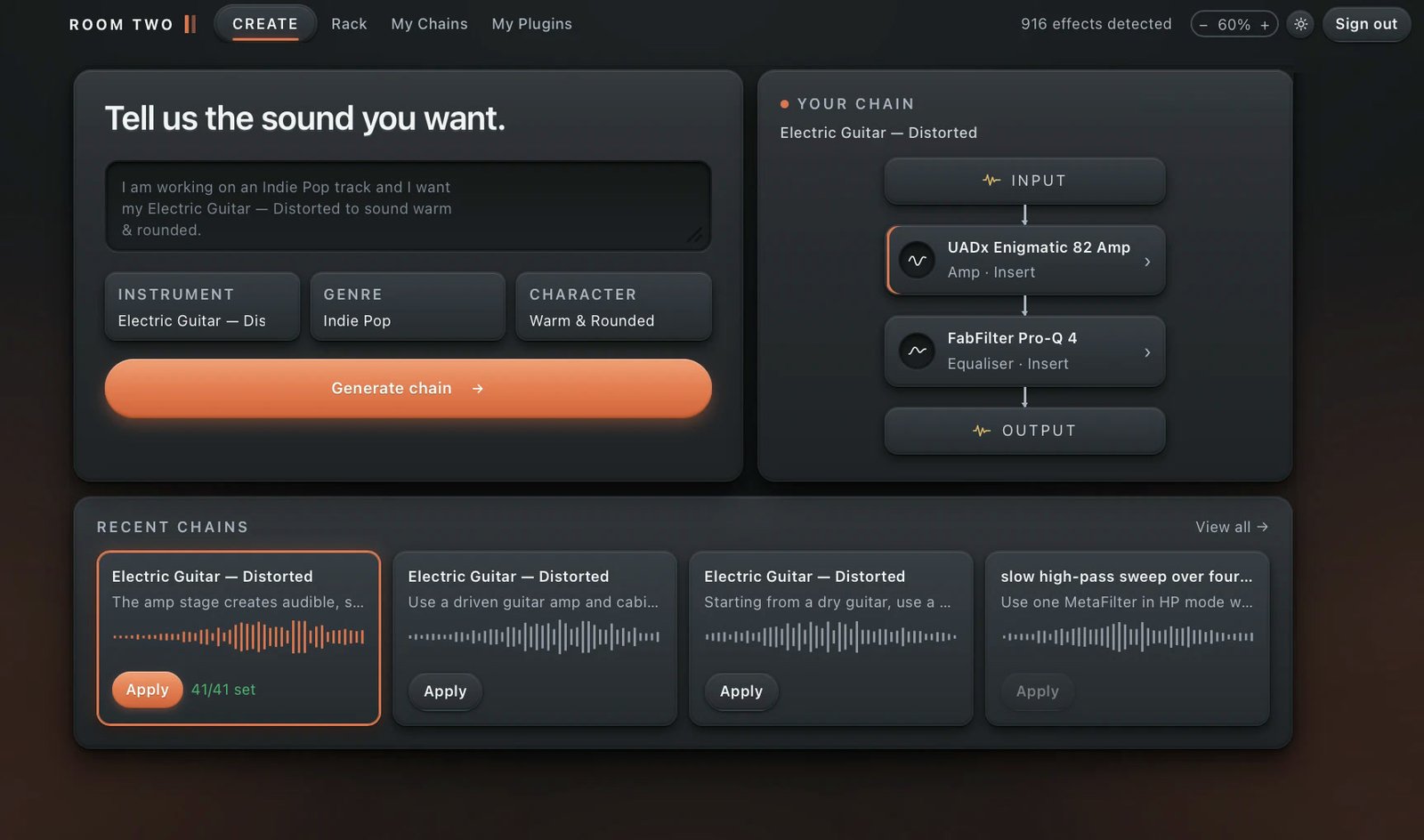
Describe the sound you want. ROOM II builds an editable chain with the plugins you already own.
How it works
Search any instrument, vocal, genre or artist and get a complete plugin chain, settings and explanations — built around your sound, your plugins and your goals.
Explore sounds
See the exact chain and starting settings to try.
Based on the sounds and artists you want to match.
Recommendations tailored to the plugins you own.
Get real-time suggestions directly in your session.
0:00
Signal flow
What this one cost
Ask ROOM TWO what you are trying to make something sound like, and the processing chain it builds will be kept here.
Earlier chains
Click a Chain to rename it
Mastering Suite
Describe your track, or pick what you are aiming at, and ROOM TWO will build a mastering chain from the plugins you own, with settings to start from.
1. Tell us about your mix
The controls are here; the chain behind them is not built yet.
These are the plugins ROOM II currently supports: it can load each one in Logic Pro and set its controls from a chain. New plugins are being added regularly, so if yours is not here yet, check back.
314 plugins from 7 makers.
ROOM II for Logic Pro
Describe your sound. ROOM II builds an editable chain using plugins you already own, directly inside Logic Pro.
macOS · Logic Pro 11 or later
Tell ROOM II what you’re going for — from a vibe, reference or sonic goal.
It creates a tailored processing chain using compatible plugins you own.
The chain loads in Logic Pro with starting settings, ready to adjust and make your own.
ROOM II doesn’t just recommend a chain — it sets up your plugins inside Logic Pro with starting settings, so you can hear the result straight away.

FabFilterWavesUniversal AudioSoundtoysiZotopeArturiaValhalla DSP
Check compatibilityA production-ready starting point you can build on. Listen to the same guitar, before and after a ROOM II chain.
A monthly plan for a fresh allowance every month, or a one-off top-up whenever you need more. You can do both.
One-off, no subscription. Twelve months to use them.
Signed in as
—
Most of the wait is the model writing. These trade some of what it writes, or some of what it checks, for getting it back sooner.
How much it writes
The relevance check
Change your password, or sign out of this device.
ROOM TWO Beta 3.001
Welcome back.
Those two do not match.
Help with ROOM TWO and the ROOM II plugin.
More answers are in Frequently Asked Questions.
Download ROOM II for Logic Pro, get set up, and get the most from your chains.
M-series Mac · macOS 11 or later
Intel Mac · macOS 10.13 or later
ROOM II for Logic Pro. Not sure which Mac you have? Apple menu › About This Mac. Quit Logic, open the downloaded file and double-click “Install ROOM II”.
Downloading the right installer for your Mac, installing it, and opening ROOM II in Logic Pro.
Scanning the plugins on your Mac, and choosing which ones chains may use.
Describing a sound, building the chain, and letting ROOM II set your plugins.
Switching ROOM II on and off cleanly while you listen.
Can’t find what you need? Try the Frequently Asked Questions or contact Support.
Quick answers to the questions we hear most.
ROOM TWO is a production and mixing assistant. Describe the sound you want, in your own words or by naming a record, and it builds a processing chain for it: which plugins to use, in what order, and how to set each one.
A chain is the set of plugins for one sound, in signal order, with the settings for each and the reason behind them. Every chain you build is saved under My Chains.
Logic Pro on a Mac, the ROOM II plugin, a ROOM TWO account and the plugins you already own. ROOM II finds the plugins on your Mac, builds chains from the ones it supports and sets them for you.
Yes. A new account includes free chains, so you can see what it does before you pay. The current allowance is on the Pricing page.
ROOM II is an Audio Unit effect for Logic Pro. It is a rack: it loads your own plugins inside it, builds a chain from what you describe, and sets those plugins' controls for you. You still hear and adjust everything in Logic.
Logic Pro on macOS. There are two downloads: Apple Silicon (M1 to M6), which needs macOS 11 or later, and Intel, which works back to macOS 10.13. Apple menu › About This Mac shows which you have.
Open Help › Downloads: Setup and Help Videos and choose the download for your Mac. Quit Logic, open the downloaded file, double-click Install ROOM II and follow the steps. Then in Logic, click an Audio FX slot and choose Audio Units › ROOM II › Room II, and sign in with your ROOM TWO account.
In Logic, open Logic Pro › Settings › Plug-in Manager, find ROOM II and click Reset & Rescan Selection. Make sure you installed the download that matches your Mac.
On ROOM II's Rack page, click Scan for plugins. ROOM II keeps its own list, so a plugin you install later appears after a rescan on My Plugins.
No. Logic doesn't make its own plugins available to other plugins. Chains can still use them: ROOM II names the plugin and its settings, and you set them in Logic.
Not yet. ROOM II is a plugin for Logic Pro on a Mac for now.
Use the bypass button at the top of ROOM II's Rack page. It switches cleanly. Logic's own on/off button on the channel also works, but Logic re-times the track when a plugin with latency is switched, so you may hear a small jump.
Supported plugins are ones we have tested end to end: their controls named, chains checked, and settings applied in Logic. Chains are built only from supported plugins, and only supported plugins appear on My Plugins. We add more as testing finishes. Logic’s own plugins aren’t listed: ROOM II can’t set them.
Yes. Chains are built from the plugins ROOM II finds on your Mac, and you can switch any of them off on its My Plugins tab. ROOM TWO doesn't sell or include third-party plugins.
A chain uses part of your allowance; the counts on the Pricing page show how many chains each plan or top-up gives. Chains built in Logic come from the same balance as chains built on the website.
A plan gives a fresh allowance every month, and unused chains roll over up to one extra month's worth. A top-up is a one-off purchase with no subscription, and you have twelve months to use it. Plan chains are spent first.
Yes, at any time. Unused plan chains end with your billing period; top-up chains stay yours.
You can ask for a refund of unused chains within 14 days of buying them. Chains already spent aren't refundable. If something you paid for didn't arrive, tell us and we'll put it right. The Terms have the details.
Your studio details and the questions you ask are used to build your chains. The Privacy page explains exactly what is stored and why.
Go to Help › Support.
How roomtwo.io handles your account, your studio details and the questions you ask. Last updated 12 October 2026.
This policy describes the service as it actually works. There is nothing here the app does not do, and nothing it does that is left out.
roomtwo.io is operated by IWAY Studios Limited (company number 17416986), the data controller for the personal data described below. For anything in this policy, including a request to exercise your rights, contact contact@roomtwo.io.
We do not use advertising trackers, we do not build profiles for marketing, and we do not sell personal data to anyone.
This is the part worth reading twice, because it is the heart of what the service does.
When you ask for a chain, we send to Anthropic or OpenAI — whichever model you picked — your question, your studio details, and the list of plugins and hardware you own. We do not send your email address, your name, your billing details or any account identifier. The provider receives the context needed to answer and nothing that identifies you.
Both are in the United States, so this is an international transfer. Both act as our processors under their API terms, which say they do not use data sent through the API to train their models, and retain it only briefly for abuse monitoring. We have no control over that retention beyond those terms.
If you would rather a question were never sent to either, the answer is not to ask it — there is no version of this service that produces a chain without sending the question to a model.
We do not process special category data. ROOM TWO does not record you, does not ask for anything about your health, beliefs or identity, and has no feature that would collect it.
Five processors. Each acts only on our instructions under a written contract, and none may use your data for their own purposes.
| Processor | What it does | Where |
|---|---|---|
| Supabase | Sign-in, and the database holding your account, studio, plugins, chains and billing records | European Union |
| Anthropic | Receives your question, studio and plugin list; returns a chain | United States |
| OpenAI | The same, when you choose an OpenAI model | United States |
| Stripe | Takes payments. Your card details go to Stripe directly and never reach our servers | United States / EU |
| Hostinger | Serves the website itself. Its web server logs include IP addresses, as all web servers do | European Union |
You can ask us to give you a copy of your data, correct it, delete it, restrict or object to how we use it, or send it to another provider. Email contact@roomtwo.io and we will respond within one month.
If you think we have handled your data badly you can complain to the Information Commissioner’s Office at ico.org.uk — though we would rather you told us first, so we can put it right.
Traffic is encrypted in transit. Your rows in the database are scoped to your account, so another signed-in user cannot read your chains, your studio or your plugin list. API keys for the model providers and for Stripe are held server-side and never reach the browser.
We store a sign-in token so you stay signed in between visits, and a small preference for whether you chose the light or dark theme. That is all. There are no advertising or analytics cookies.
This service is not intended for anyone under 16.
If we change this policy we will update the date at the top, and for anything material we will tell you by email before it takes effect.
The agreement between you and us when you use roomtwo.io. Last updated 12 October 2026.
By creating an account you accept these terms.
roomtwo.io is operated by IWAY Studios Limited (company number 17416986), registered in England and Wales. Contact us at contact@roomtwo.io.
You describe your studio, tell us which plugins and hardware you own, and ask a question about how you want something to sound. We send that to an AI model — Anthropic’s or OpenAI’s, whichever you pick — and return a suggested processing chain built from gear you actually have.
It is advice, not instruction. The chain is generated by a language model. It can be wrong, it can suggest settings that do not suit your material, and it has never heard your track. You are the engineer: listen, judge, and change anything that does not serve the music. Nothing ROOM TWO returns is a guarantee of a result, and we do not accept responsibility for mix or production decisions you make on the strength of it.
Keep backups of your projects. We are not liable for work lost to a change you made because a chain suggested it.
You must be 16 or over. Give us a working email address, keep your password to yourself, and tell us promptly if you think someone else has got into your account. One account is for one person — accounts are not to be shared or passed around.
The service is sold in chains. One chain is one question answered.
A chain costs what it costs. The counts we advertise are measured on the standard model. The quicker models go further; the premium ones use more of your allowance for the same question. The model is your choice and the cost follows it.
A question that fails before producing an answer is not charged.
Prices are in pounds sterling and include any tax due. Payment is handled by Stripe — we never see your card number.
Monthly plans renew automatically on the same date each month until you cancel. You can cancel at any time from Manage billing on your Account page; your plan then runs to the end of the period you have paid for and does not renew. We do not charge a cancellation fee.
We may change prices. Existing subscribers get at least 30 days’ notice by email before a change takes effect, and you can cancel before it does.
If a payment fails to deliver what it bought — chains that never arrive, a plan that does not activate — tell us and we will put it right or refund you in full.
Beyond that: you can ask for a refund of unused chains within 14 days of buying them, and we will give one. Once chains have been spent, the model has been run and the cost is real, so spent chains are not refundable.
None of this affects your statutory rights as a consumer under UK law.
We may suspend or close an account that does these things. Where it is fair to do so, we will refund unused chains when we close an account; where the account was closed for abuse, we may not.
Your questions and your studio details are yours. You give us permission to process them for the purpose of answering, and nothing else — the Privacy page says exactly where they go.
The chains we return are yours to use, commercially and without credit. We claim no rights over the music you make with them.
The site, the plugin catalogue, the wording and the design are ours. You may not copy them.
Bear in mind that model output is not reliably original and we cannot warrant that a chain is unique to you. Another producer asking a similar question may get similar advice.
ROOM TWO is in beta. We do not promise a particular level of uptime. The service depends on Supabase, Anthropic, OpenAI and Stripe, and an outage at any of them can stop it working.
If the service is unavailable for a long enough stretch to matter, tell us and we will extend your plan or refund the period fairly. We are not liable for losses caused by downtime beyond that.
Nothing here limits our liability for death or personal injury caused by negligence, for fraud, or for anything else the law does not allow us to limit.
Subject to that, our total liability to you for anything arising out of these terms is limited to the amount you have paid us in the twelve months before the claim. We are not liable for lost profit, lost work, lost recordings, or any loss that was not a foreseeable consequence of what went wrong.
You can delete your account at any time from your Account page. Deletion is immediate and removes your profile, studio, plugins and chains. Unused chains are forfeited on deletion, so spend or refund them first if they matter.
We may end this agreement by giving you 30 days’ notice, and will refund unused chains if we do.
We may update these terms. The date at the top changes, and for anything material we will tell you by email before it takes effect. If you do not accept a change, you may cancel and ask for a refund of unused chains.
These terms are governed by the law of England and Wales, and the courts of England and Wales have jurisdiction. If you live elsewhere in the UK you keep the protection of your local consumer law.